
B2B Industrial Grade 3D CAD Design Software

IRON CAD

Design faster with an easy top-down workflow.

IRON CAD helps engineering teams create concepts, jigs, equipment, and large assemblies through direct modeling, practical positioning, and broad CAD data compatibility.

3DDirect Modeling
2D + 3DConnected Design
DWGData Compatibility
Engineering Workflow

Move from concept to design faster

Direct modeling and part-assembly management in one file help reduce unnecessary steps while developing equipment concepts.

Focus on designTeams can validate concepts and develop details in the same workflow.
Design Challenge

Complex CAD workflows slow down concepts

2D/3D

Different workflows for 2D, parts, and assemblies can add work when concepts change.

Challenges to Control

  • Longer concept development time
  • Repeated steps when designs change
  • CAD data from other systems is harder to reuse
  • Parts and assemblies are managed separately
Engineering Design

Built for manufacturing design work

IRON CAD supports machinery, jig, equipment, sheet metal, and large assembly design in one working environment.

2D + 3D
One connected design workflow
IRON CAD

Seven Core Advantages

Design features that help engineering teams move from concept to detail faster.

01

Direct Modeling

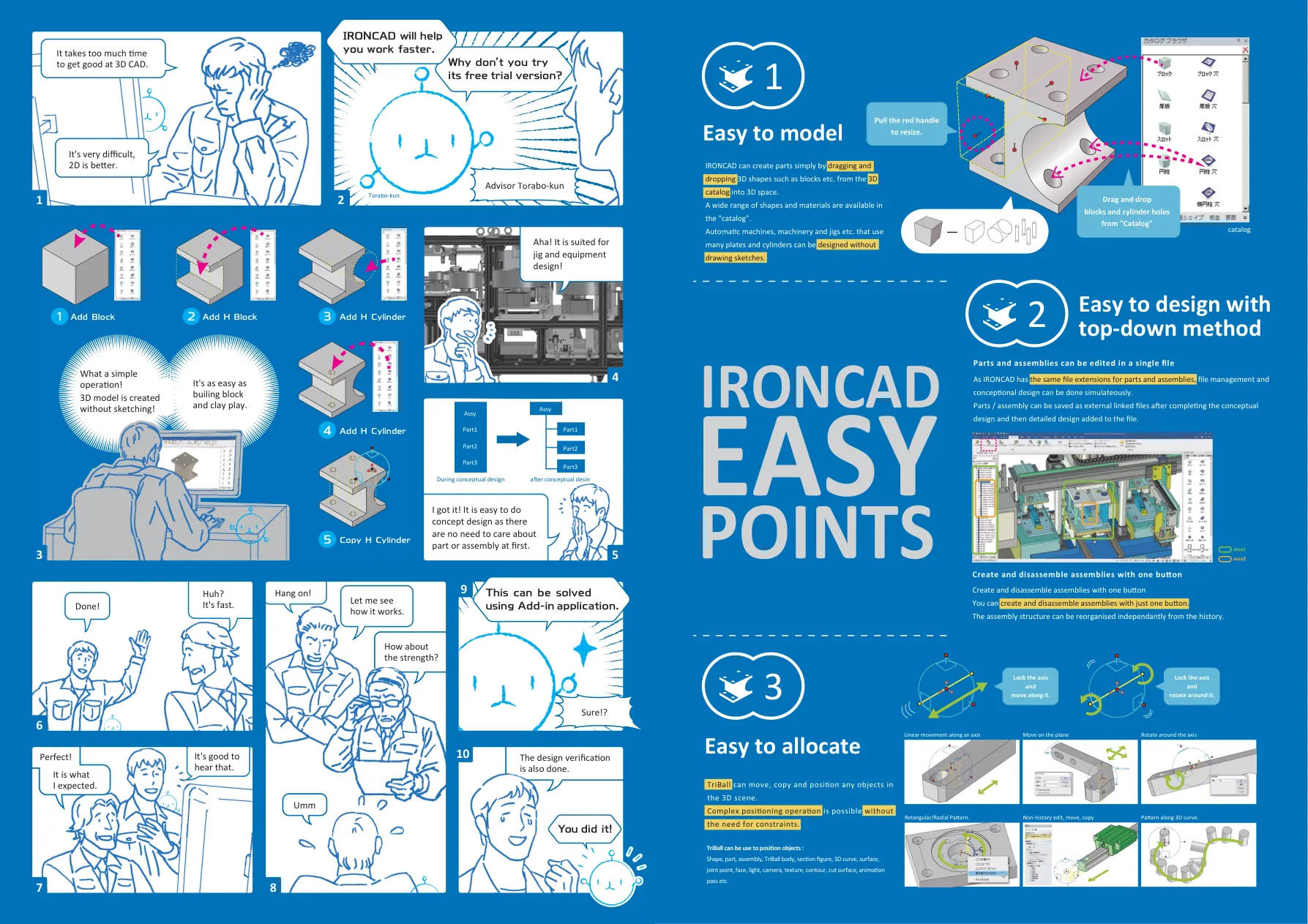
Create three-dimensional shapes with drag and drop without starting from a complex sketch.

02

Assembly Without Constraints

TriBall makes positioning and assembly grouping easier without excessive constraints.

03

Easy Top-down Design

Develop part and assembly concepts in one file with a design flow similar to 2D.

04

Light Large-scale Assembly

Large assembly data can still be edited with quick response.

05

CAD Data Compatibility

ACIS and Parasolid support helps reduce errors when exchanging CAD data.

06

Intermediate Files Can Be Edited

Data with or without history can be edited and reused in the design process.

07

DWG-compatible 2D CAD

Read, edit, and save DWG or DXF files and create 2D drawings linked to 3D models.

IRON CAD 3D FEATURES

3D design features

Build, verify, and communicate 3D models through a practical design workflow.

Extrude, Spin, Sweep, Loft

Create models from sketches like other CAD products, including shapes outside standard catalogs.

Mechanism Mode

Verify component collisions and interference by assembling parts and applying positioning constraints.

Geometric Constraints

Align part positions or assign angles while creating sketches, applying constraints as required.

Animation Creation

Simulate motion with animation using the available motion options.

IRON CAD 2D FEATURES

2D drafting features

Connect 3D models with drawings and production documentation more efficiently.

3D to 2D Link

Create projection drawings easily. 2D contents update automatically when the 3D model changes.

Bill of Materials and Item No.

Automatically create parts lists and item numbers associated with parts and assemblies in 3D and 2D.

Auto Dimension and Auto Hole Table

Automatically create dimensions and hole tables to reduce the time and effort required for drawings.

With IRON CAD

Design Workflow Comparison

Separate Workflows

Separate Workflows

  • 3D concepts begin with lengthy sketch work
  • Parts and assemblies follow separate workflows
  • Position changes require many constraints
  • CAD data from other software needs additional adjustment
With IRON CAD

IRON CAD

  • Basic shapes can be created with drag-and-drop
  • Parts and assemblies can be developed in one file
  • TriBall supports intuitive positioning
  • DWG, DXF, and other CAD data are supported
Engineering Design

Features for engineering work

From direct modeling to 2D CAD, IRON CAD provides features for equipment and machinery design work.

Speed up your equipment design process

Discuss your 2D, 3D, jig, or machinery design needs with our engineering team.

Product Consultation